
Pet sitting questionnaire and client intake form
Last updated: 6 November 2026
Ask about dates, location, pets and the care needed before you quote. Once you agree to a booking, record owner contacts, home access and trip details in a client intake form. Use the four inquiry questions below for your first reply.
Get Starter · $12 once Compare both packs
The editable New Client Intake Form comes in the $12 Starter and $19 Complete packs. Word source files + printable A4 and US Letter PDFs. One business, unlimited clients. Read the license.
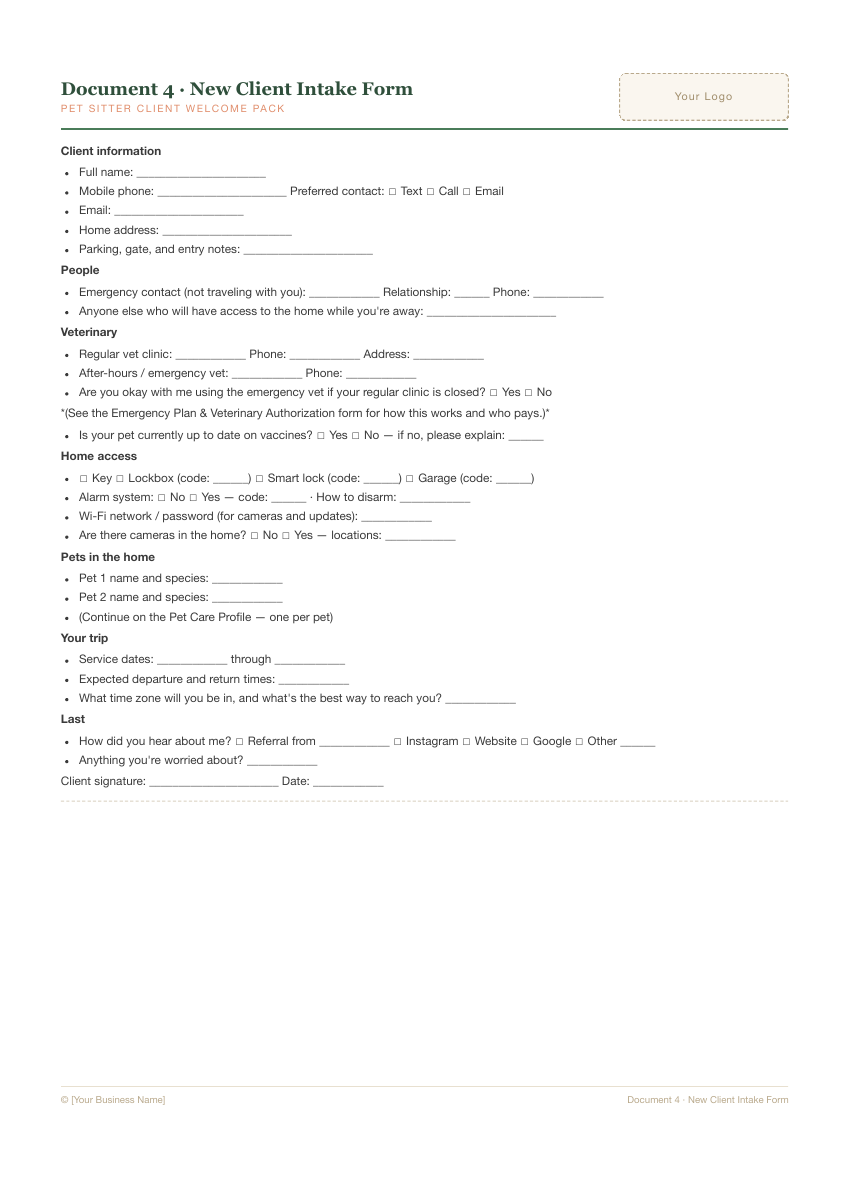
Pet sitting questionnaire: what to confirm before a booking
Start with the service, dates, location and pets so you can decide whether the booking is a fit. Collect the full client record once you have agreed to go ahead. Confirm access and emergency contacts before the first visit.
Keep feeding, medication and individual pet routines in a separate care profile, and confirm emergency decisions in the appropriate authorization. The intake form below records client, home and booking details; it does not replace either of those documents.
Make booking details clear across borders
If the owner is travelling, record how to reach them and the time zone for calls. Write dates with the month in words, such as 3 November 2026, rather than an ambiguous number-only date. Include country codes on phone numbers and name the currency beside agreed charges. In the editable Word file, use the address terms your clients recognise, such as postcode or ZIP code, then export a new PDF.
The fields in the intake form
- Client information: name, mobile phone, preferred contact method, email, home address and entry notes.
- People: an emergency contact who is not traveling with the owner, plus others who will access the home.
- Veterinary contacts: regular and after-hours clinics, emergency-vet preference and vaccination status.
- Home access: key or lockbox, smart lock or garage, alarm instructions and camera locations.
- Pets and trip: pet names and species, service dates, departure and return times, time zone and contact details.
- Final notes: referral source, client concerns, signature and date.
The intake form points to a separate Pet Care Profile for each pet’s care details and an Emergency Plan & Veterinary Authorization for emergency decisions. Those separate documents are included in Complete. Starter includes the same intake form, but does not include those two documents.
A short pet sitting questionnaire for the first inquiry
You can answer an availability question without asking the owner to complete the whole intake form. Start with these questions, then discuss the service and price.
- Which dates do you need, and are you looking for drop-ins, walks or overnight care?
- Which area is the home in, and how many pets need care?
- What visit length and time windows do you need?
- Is there anything about access, handling or care that we should discuss before a meet and greet?
These are suggested questions for your inquiry reply, not an extra file in the pack. Explain what you need next and collect detailed access information through your agreed private process.
Keep household details together; give each pet its own care record
Record the owner, home access and trip contacts once in the client information form. For two pets at the same address, keep their feeding routines and individual instructions in separate care profiles. Confirm what has changed before the next booking rather than asking the owner to repeat every answer.
The editable intake form comes in both packs. Complete also includes the separate Pet Care Profile. Use the meet-and-greet checklist to check the details together, then see daily update examples for messages during the booking.
Returning client? Confirm what changed before the next booking
Send the owner the details you need them to review rather than a fresh pile of blank forms. Check booking dates and visit times, who can be reached during the trip, home access, and each pet’s current care instructions. Ask them to confirm unchanged details too.
A message you can adapt
“Hi Alex, I’m checking the details for Milo’s next booking. Have the visit times, emergency contact, home access or care instructions changed since our last visit? Please review the current record and let me know what needs updating, or confirm it is still correct. We can use our usual private channel for access details.”
This is an on-page message example, not an extra document or an automatic reminder included in either pack. Edit it for the booking and the records you already hold.
A text message and an old form say different things
Ask the owner which instruction applies to this booking before relying on either version. A newer message may describe a temporary change; copying it into the permanent care profile without checking can create another mismatch.
- Name the difference. For example: “The saved visit plan says 30 minutes, but your latest message says 45. Which visit length should we agree for these dates?”
- Record the confirmed change. Note what applies, its start and end dates if temporary, and when the owner confirmed it. Keep earlier signed documents rather than silently replacing them.
- Check the working copy. Make sure the person providing care can find the confirmed version. Collect any separate authorization the change requires; a general intake note does not replace it.
Keep entry codes and household details in your agreed private process, outside routine visit updates or public examples. The Word documents help you keep records; they do not sync client messages or manage access permissions.
A filled-in example: details another sitter could use
Fictional example for illustration. These entries show how three existing intake fields might be completed. They are not a real client record or a customer testimonial.
- Emergency contact: Sam Reed, the owner’s sister, is not traveling with the owner. Her phone number is confirmed during intake so the sitter has an available contact.
- Home access: Key in the lockbox; the access code is shared separately. Confirm the agreed arrival window before the first visit.
- Trip details: Away 3–10 November; returning on the evening of 10 November. Contact times use GMT (UTC+0).
“Key available” leaves the handover unclear. Recording where the key is, how access details will be shared, and who can answer during the trip gives the sitter something usable to confirm before the booking.
Edit the Word file, then print or export
- Open 04_New_Client_Intake_Form.docx in Microsoft Word. Replace business placeholders and adjust the questions for your service.
- Save a master copy, then make a copy for each new client. After the initial inquiry, collect the full details during intake or the meet and greet and confirm them before the first booking.
- Print your edited Word document, or export it to PDF using Word. The included A4 and US Letter PDFs are ready to print and complete by hand; they are not fillable PDFs.
Choose the pack that includes what you need
Starter
$12 once
4 editable Word documents: welcome letter, client intake form, service agreement and daily report. Includes printable pack PDFs in A4 and US Letter.
Get Starter · $12Complete
$19 once
11 editable client Word documents, including the same intake form, Pet Care Profile and Emergency Plan & Veterinary Authorization. Includes printable pack PDFs in A4 and US Letter and additional quick-print forms.
Get Complete · $19Both packs license one business to use the documents with unlimited clients. Review the full pack contents, license and refund terms before buying.
When to use each form across the client relationship
Use this timeline to choose and update your client records. Pack labels show which documents are included; see the full contents before choosing a pack. Confirm care instructions and any required consent before the relevant service begins.
| Stage | Existing files that apply | Who fills | When to confirm or update | Guide entry |
|---|---|---|---|---|
| Inquiry / consultation | Client Welcome Letter (Starter + Complete); Services & Rate Card (Complete only); Meet Your Sitter (Complete only) | You send branded drafts; the owner replies with interest and basic questions | Before quoting: services, rates, and what the booking covers | Pack contents |
| Meet and greet | Meet & Greet Checklist (Complete only); New Client Intake Form (04_New_Client_Intake_Form.docx, Starter + Complete); Pet Care Profile (Complete only) |
You facilitate; owner supplies contacts, access, and pet details | During or right after the visit — capture what you saw in the home | Meet & greet checklist |
| Before the first booking | Service Agreement & Policies (Starter + Complete); Emergency Plan & Veterinary Authorization (Complete only); optional Complete quick-print veterinary authorization PDF; Key Release Log and Off-Leash Consent quick-print PDFs (Complete only; complete before the relevant service) | Both parties: you prepare; owner reviews, fills limits/choices, and signs where required | Confirm signed copies and emergency contacts before the first service day | Vet authorization |
| During service | Daily Report Card (Starter + Complete); Pet Care Profile for feeding/meds (Complete only) | You record visits; the owner confirms any changed care instructions or new consent before you act | Each visit or at agreed checkpoints; update care profile when routines change | Key access · Daily-report demo |
| After an incident | Incident Report quick-print PDF (included in Complete; a free A4/US Letter version is also available); Emergency Plan & Veterinary Authorization for clinic/spend/CPR choices (Complete only) | You record facts; owner and clinic may add their own paperwork outside this pack | As soon as practical after the event; keep copies with the booking file | Incident reports |
| When important information changes | New Client Intake Form; Pet Care Profile (Complete only); Emergency Plan & Veterinary Authorization (Complete only) | Owner notifies; you update and date a copy, re-confirm it, and retain earlier signed versions | After move, new pet, new vet, new keys/alarms, or new emergency contact — before the next booking | This page · Vet authorization |
Templates help you organize information. They are not legal advice, do not create a contract by themselves, and do not guarantee that a veterinary clinic will accept a particular authorization form. Follow clinic policy and local rules.
Pet sitting handover checklist: close the booking with clear records
Agree these arrangements during intake, then confirm what happened at the end of the booking. Keep the final visit, the owner’s return and the key handover as separate facts.
- Final visit: record when you left, the care completed and anything the next caregiver needs to know.
- Return home: record the owner’s confirmation or the agreed person taking over care. If plans change, confirm who can cover the gap.
- Keys and access: record who received the key and when, or confirm the agreed storage arrangement. Keep entry codes out of routine visit messages and public examples.
- Open items: note any unanswered question or follow-up and who will handle it. Keep unresolved items visible instead of marking the whole booking complete.
This is an on-page checklist, not an additional form in Starter or Complete. Complete includes a quick-print Key Release Log; check the pack contents before choosing. For messages you can adapt, see the final-visit and delayed-return examples.
Who this intake form is for
This document suits independent pet sitters and dog walkers who want a reusable client record they can edit in Word. It records owner, home and booking details; it is not scheduling, payment or team-management software.
Want to try a free form before choosing a pack? Open the free pet-sitting incident report. It records an incident after it happens and does not replace client intake or veterinary authorization.
Keep intake, care instructions and visit reports separate
The intake form records client and booking details. Use a care profile for feeding, medication and routines, and a daily report to record the visit. Our Willow Walks / Milo daily-report demonstration is a fictional completed example of a daily report, not an intake form or a real customer story.
This is general information for pet sitters, not legal or tax advice. Requirements vary by location and service. Check with the relevant local authority and have agreements reviewed by a qualified legal professional in your jurisdiction.